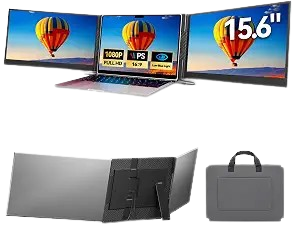
Laptop Screen Extender
A Laptop Screen Extender is a versatile portable display accessory designed to instantly expand your laptop’s screen space and create a more productive multi-screen workstation wherever you work. Instead of constantly switching between applications, browser tabs, documents, spreadsheets, and communication windows, an additional laptop display gives you more room to keep important information visible at the same time. This makes a laptop screen extender an excellent choice for professionals, students, remote workers, programmers, designers, content creators, traders, business travelers, and anyone who regularly multitasks. The extender is designed to work alongside your laptop’s built-in display, allowing you to arrange applications across two or more screens depending on the specific model and compatible setup. You can use the primary laptop display for your main project while keeping emails, calendars, research material, video meetings, reference documents, messaging applications, or productivity tools open on the additional screen. This expanded workspace can help reduce the need to repeatedly minimize and reopen windows, making everyday computer tasks feel more organized and efficient. Many laptop screen extenders feature a slim, lightweight, and portable design that makes them suitable for home offices, workplaces, classrooms, libraries, cafés, hotels, and travel. Unlike a traditional desktop monitor, a portable laptop display can be carried with your computer, making it a convenient option for people who frequently change work locations. Depending on the model, the screen may attach directly to the laptop and fold inward when not in use, helping create a compact setup that is easier to transport and store. Adjustable positioning or hinges on compatible designs can allow the screen to be angled for improved viewing comfort and alignment with the main laptop display. Connectivity options can include USB-C, HDMI, or other compatible interfaces, although users should always check their laptop’s available ports and display-output capabilities before purchasing. Some models may support plug-and-play functionality, while others may require specific drivers or software depending on the computer and operating system. A laptop screen extender can be particularly useful for remote work and online meetings, allowing users to keep a video conference visible on one display while working with documents or taking notes on another. Students can use the extra screen for online lectures, research, presentations, and note-taking, while professionals can keep project management software, spreadsheets, email, and communication tools organized across multiple displays. Creative users can benefit from having additional space for editing timelines, design tools, reference images, previews, and other workflow controls. Programmers can dedicate one screen to code while using another for documentation, testing, terminals, or browser windows, making it easier to work across multiple resources simultaneously. The extended display can also enhance entertainment and casual use by providing additional space for browsing, streaming, gaming-related applications, or social media while keeping the main laptop screen available for another task. Its compact form factor makes it a particularly attractive solution for users who want the benefits of a dual-monitor setup without permanently occupying a desk with large external monitors and multiple stands. A well-designed laptop screen extender can also help create a cleaner, more organized workspace by keeping the displays connected to the laptop rather than requiring separate desktop monitor arrangements. Whether you are working from home, traveling for business, studying at school, managing several projects, editing creative content, attending virtual meetings, or simply wanting more room for everyday computing, a Laptop Screen Extender offers a practical way to increase your available screen real estate. By combining portability, convenience, flexible positioning, and expanded workspace functionality, it can transform a standard laptop into a more capable mobile workstation while preserving the flexibility that makes laptops so useful. For the best experience, users should verify screen size compatibility, laptop dimensions, operating-system support, connection type, power requirements, resolution, refresh rate, mounting method, and weight before selecting a particular model. With the right compatible setup, a laptop screen extender can provide a convenient and efficient solution for people who want to multitask more comfortably, stay organized, improve productivity, and enjoy a larger digital workspace without giving up laptop portability.

Reviews
There are no reviews yet.